New User Features
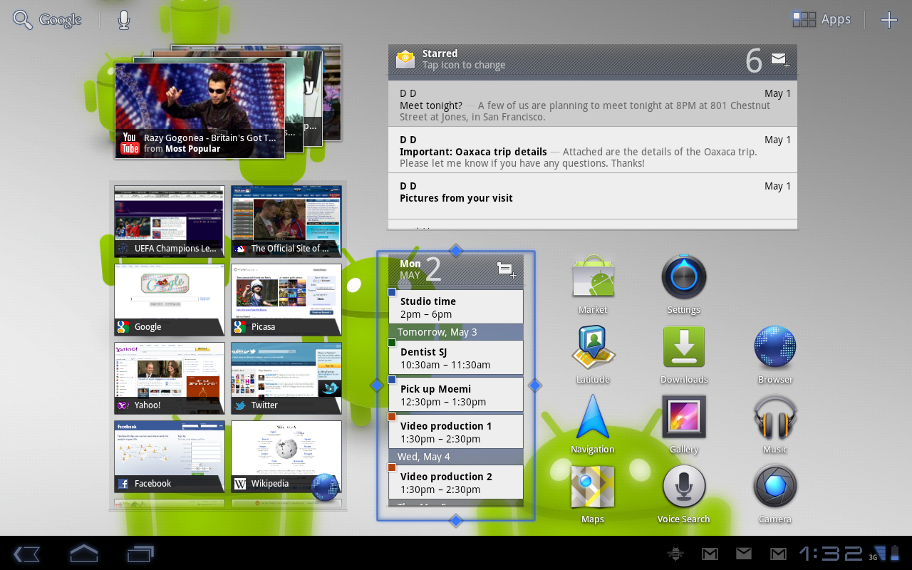
Figure 1. An Android 3.1 Home screen.
UI refinements
The Android 3.1 platform adds a variety of refinements to make the user interface more intuitive and more efficient to use.
UI transitions are improved throughout the system and across the standard apps. The Launcher animation is optimized for faster, smoother transition to and from the Apps list. Adjustments in color, positioning, and text make UI elements easier to see, understand, and use. Accessibility is improved with consistent audible feedback throughout the UI and a new setting to let users customize the touch-hold interval to meet their needs.
Navigation to and from the five home screens is now easier — touching the Home button in the system bar now takes you to the home screen most recently used. Settings offers an improved view of internal storage, showing the storage used by a larger set of file types.
Connectivity for USB accessories
Android 3.1 adds broad platform support for a variety of USB-connected peripherals and accessories. Users can attach many types of input devices (keyboards, mice, game controllers) and digital cameras. Applications can build on the platform’s USB support to extend connectivity to almost any type of USB device.
The platform also adds new support for USB accessories — external hardware devices designed to attach to Android-powered devices as USB hosts. When an accessory is attached, the framework will look for a corresponding application and offer to launch it for the user. The accessory can also present a URL to the user, for downloading an appropriate application if one is not already installed. Users can interact with the application to control powered accessories such as robotics controllers; docking stations; diagnostic and musical equipment; kiosks; card readers; and much more.
The platform’s USB capabilities rely on components in device hardware, so support for USB on specific devices may vary and is determined by device manufacturers.
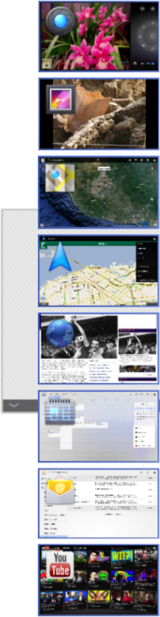
Figure 2. The Recent Apps menu is now expandable and scrollable.
Expanded Recent Apps list
For improved multitasking and instant visual access to a much larger number of apps, the Recent Apps list is now expandable. Users can now scroll the list of recent apps vertically to see thumbnail images all of the tasks in progress and recently used apps, then touch a thumbnail to jump back into that task.
For more flexible Home screen customization, users can now resize their Home screen widgets using drag bars provided by the system. Users can expand widgets both horizontally and/or vertically to include more content, where supported by each widget.
Support for external keyboards and pointing devices
Users can now attach almost any type of external keyboard or mouse to their Android-powered devices, to create a familiar environment and work more efficiently. One or more input devices can be attached to the system simultaneously over USB and/or Bluetooth HID, in any combination. No special configuration or driver is needed, in most cases. When multiple devices are connected, users can conveniently manage the active keyboard and IME using the keyboard settings that are available from the System bar.
For pointing devices, the platform supports most types of mouse with a single button and optionally a scroll wheel, as well as similar devices such as trackballs. When these are connected, users can interact with the UI using point, select, drag, scroll, hover, and other standard actions.
Support for joysticks and gamepads
To make the platform even better for gaming, Android 3.1 adds support for most PC joysticks and gamepads that are connected over USB or Bluetooth HID.
For example, users can connect Sony Playstation™ 3 and XBox 360™ game controllers over USB (but not Bluetooth), Logitech Dual Action™ gamepads and flight sticks, or a car racing controller. Game controllers that use proprietary networking or pairing are not supported by default, but in general, the platform supports most PC-connectible joysticks and gamepads.
Robust Wi-Fi networking
Android 3.1 adds robust Wi-Fi features, to make sure that users and their apps can take full advantage of higher-speed Wi-Fi access at home, at work, and while away.
A new high-performance Wi-Fi lock lets applications maintain high-performance Wi-Fi connections even when the device screen is off. Users can take advantage of this to play continuous streamed music, video, and voice services for long periods, even when the device is otherwise idle and the screen is off.
Users can now configure an HTTP proxy for each individual Wi-Fi access point, by touch-hold of the access point in Settings. The browser uses the HTTP proxy when communicating with the network over the access point and other apps may also choose to do so. The platform also provides backup and restore of the user-defined IP and proxy settings.
The platform adds support for Preferred Network Offload (PNO), a background scanning capability that conserves battery power savings in cases where Wi-Fi needs to be available continuously for long periods of time.
Updated set of standard apps
The Android 3.1 platform includes an updated set of standard applications that are optimized for use on larger screen devices. The sections below highlight some of the new features.
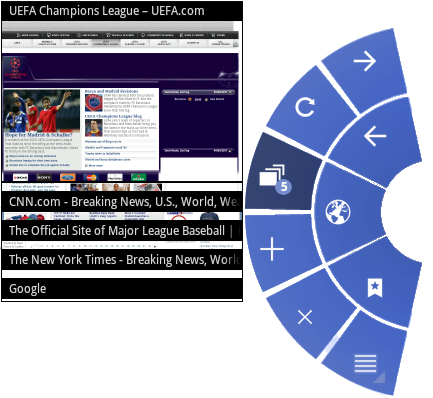
Figure 3. Quick Controls menu in the Browser.
Browser
The Browser app includes a variety of new features and UI improvements that make viewing web content simpler, faster, and more convenient.
The Quick Controls UI, accessible from Browser Settings, is extended and redesigned. Users can now use the controls to view thumbnails of open tabs and close the active tab, as well as access the overflow menu for instant access to Settings and other controls.
To ensure a consistent viewing experience, the Browser extends it's support for popular web standards such as CSS 3D, animations, and CSS fixed positioning to all sites, mobile or desktop. It also adds support for embedded playback of HTML5 video content. To make it easier to manage favorite content, users can now save a web page locally for offline viewing, including all styling and images. For convenience when visiting Google sites, an improved auto-login UI lets users sign in quickly and manage access when multiple users are sharing a device.
For best performance, the Browser adds support for plugins that use hardware accelerated rendering. Page zoom performance is also dramatically improved, making it faster to navigate and view web pages.
Gallery
The Gallery app now supports Picture Transfer Protocol (PTP), so that users can connect their cameras over USB and import their pictures to Gallery with a single touch. The app also copies the pictures to local storage and provides an indicator to let users see how much space is available.
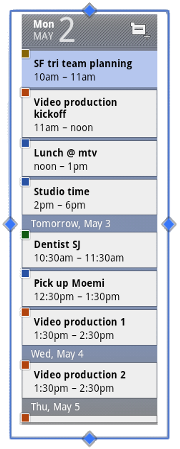
Figure 4. Home screen widgets can now be resized.
Calendar grids are larger, for better readability and more accurate touch-targeting. Additionally, users can create a larger viewing area for grids by hiding the calendar list controls. Controls in the date picker are redesigned, making them easier to see and use.
Contacts
The Contacts app now lets you locate contacts more easily using full text search. Search returns matching results from all fields that are stored for a contact.
Email
When replying or forwarding an HTML message, The Email app now sends both plain text and HTML bodies as a multi-part mime message. This ensures that the message will be formatted properly for all recipients. Folder prefixes for IMAP accounts are now easier to define and manage. To conserve battery power and minimize cell data usage, the application now prefetches email from the server only when the device is connected to a Wi-Fi access point.
An updated Home screen widget give users quick access to more email. Users can touch Email icon at the top of the widget to cycle through labels such as Inbox, Unread, and Starred. The widget itself is now resizable, both horizontally and vertically.
Enterprise support
Users can now configure an HTTP proxy for each connected Wi-Fi access point. This lets administrators work with users to set a proxy hostname, port, and any bypass subdomains. This proxy configuration is automatically used by the Browser when the Wi-Fi access point is connected, and may optionally be used by other apps. The proxy and IP configuration is now backed up and restored across system updates and resets.
To meet the needs of tablet users, the platform now allows a "encrypted storage card" device policy to be accepted on devices with emulated storage cards and encrypted primary storage.
New Developer Features
The Android 3.1 platform adds refinements and new capabilities that developers can build on, to create powerful and engaging application experiences on tablets and other large-screen devices.
Open Accessory API for rich interaction with peripherals
Android 3.1 introduces a new API for integrating hardware accessories with applications running on the platform. The API provides a way to interact across a wide range of peripherals, from robotics controllers to musical equipment, exercise bicycles, and more.
The API is based on a new USB (Universal Serial Bus) stack and services that are built into the platform. The platform provides services for discovering and identifying connected hardware, as well as for notifying interested applications that the hardware is available.
When a user plugs in a USB accessory, the platform receives identifying information such as product name, accessory type, manufacturer, and version. The platform sets up communication with the accessory and uses its information to notify and launch a targeted app, if one is available. Optionally, an accessory can provide a URL that lets users find and download an app that works with the accessory. These discovery features make first-time setup easier for the user and ensure that an appropriate application is available for interacting with the connected hardware.
For application developers and accessory manufacturers, accessory mode offers many new ways to engage users and build powerful interaction experiences with connected hardware.
To learn more about how to develop applications that interact with accessories, see the
USB Accessory documentation.
USB host API
Android 3.1 provides built-in platform support for USB host mode and exposes an API that lets applications manage connected peripherals. On devices that support host mode, applications can use the API to identify and communicate with connected devices such as audio devices. input devices, communications devices, hubs, cameras, and more.
To learn more about how to develop applications that interact with USB devices, see the
USB Host documentation.
Android 3.1 extends the input event system to support a variety of new input sources and motion events, across all views and windows. Developers can build on these capabilities to let users interact with their applications using mice, trackballs, joysticks, gamepads, and other devices, in addition to keyboards and touchscreens.
For mouse and trackball input, the platform supports two new motion event actions: scroll (horizontal or vertical) such as from a scrollwheel; and hover, which reports the location of the mouse when no buttons are pressed. Applications can handle these events in any way needed.
For joysticks and gamepads, the platform provides a large number of motion axes that applications can use from a given input source, such as X, Y, Hat X, Hat Y, rotation, throttle, pressure, size, touch, tool, orientation, and others. Developers can also define custom axes if needed, to capture motion in additional ways. The platform provides motion events to applications as a batch, and applications can query the details of the movements included in the batch, for more efficient and precise handling of events.
Applications can query for the list of connected input devices and the motion ranges (axes) supported by each device. Applications can also handle multiple input and motion events from a single input device. For example, an application can use mouse and joystick and mouse event sources from a single input device.
Developers can now create Home screen widgets that users can resize horizontally, vertically, or both. By simply adding an attribute to the declaration of a widget, the widget becomes resizable horizontally, vertically, or both. This lets users customize the display of the widget content and display more of it on their Home screens.
MTP API for integrating with external cameras
In Android 3.1, a new MTP (Media Transfer Protocol) API lets developers write apps that interact directly with connected cameras and other PTP devices. The new API makes it easy for applications to receive notifications when devices are attached and removed, manage files and storage on those devices, and transfer files and metadata to and from them. The MTP API implements the PTP (Picture Transfer Protocol) subset of the MTP specification.
RTP API, for control over audio streaming sessions
Android 3.1 exposes an API to its built-in RTP (Real-time Transport Protocol) stack, which applications can use to directly manage on-demand or interactive data streaming. In particular, apps that provide VOIP, push-to-talk, conferencing, and audio streaming can use the API to initiate sessions and transmit or receive data streams over any available network.
Android 3.1 includes a variety of performance optimizations that help make applications faster and more responsive. Some of the optimizations include:
- A new LRU cache class lets applications benefit from efficient caching. Applications can use the class to reduce the time spent computing or downloading data from the network, while maintaining a sensible memory footprint for the cached data.
- The UI framework now supports partial invalidates in hardware-accelerated Views, which makes drawing operations in those Views more efficient.
- A new graphics method,
setHasAlpha(), allows apps to hint that a given bitmap is opaque. This provides an extra performance boost for some types of blits and is especially useful for applications that use ARGB_8888 bitmaps.